
Accessibility within Learning, Inclusion, and Design
This topic often has me thinking about equity vs. equality. When I remind myself the difference in my head I always envision the image below.
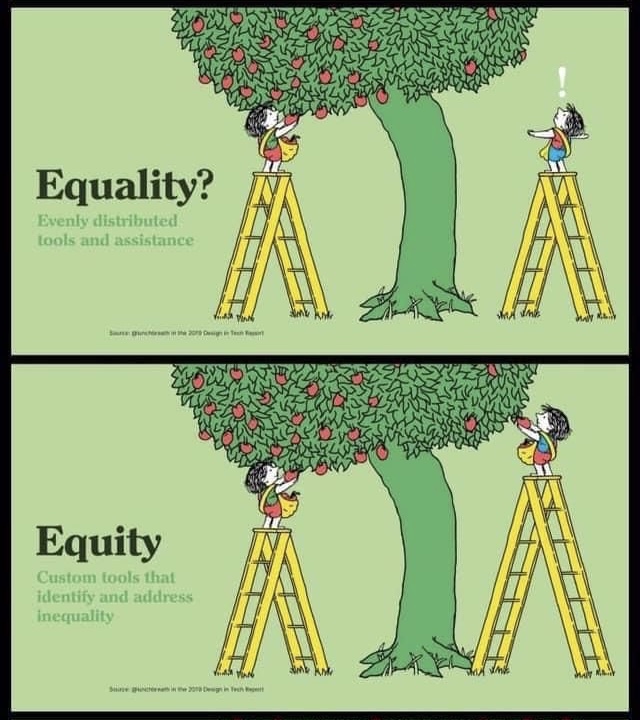
Equality is about giving everyone the same tools, while equity examines individual needs then provides the tools necessary for growth or success. As I see it, successful accessibility is proactive and comes from knowing your learners and their needs. This includes removing barriers, not finding a one time method around them. Inclusion in the learning environment means students can engage meaningfully no matter what skill set they bring into the room. To organize my ideas further, I created the following mind map below to show some the key elements I believe are crucial to an accessible learning environment.
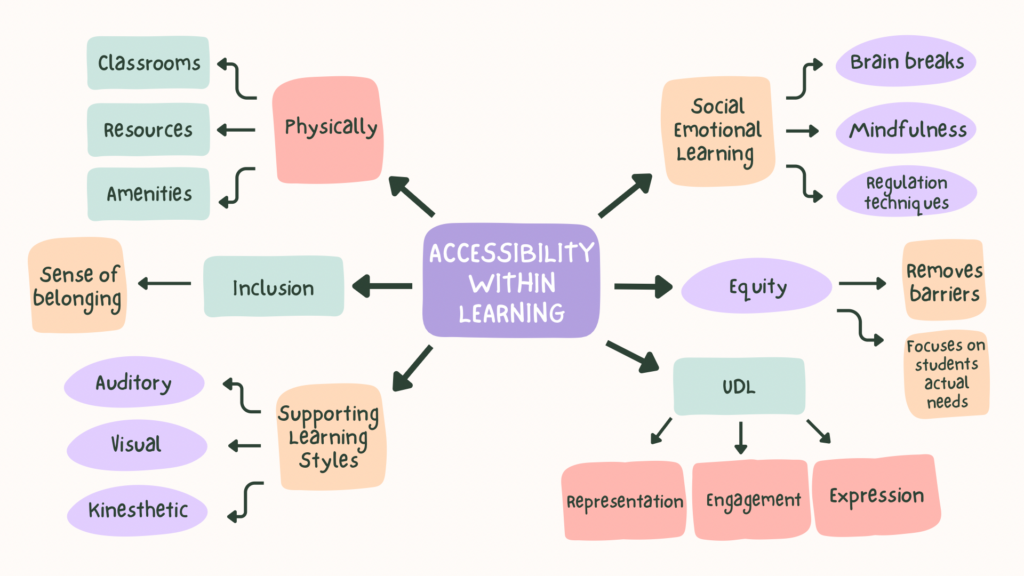
Inclusive Design
Inclusive Design directly connects to Universal Design for Learning (UDL) with both frameworks aiming to support all learners, not just those who may be struggling. This flexible approach has proven time and time again to be important for my pedagogy and for the learners I have encountered in my practice. This can be connected back to equity in the way that one size does NOT fit all nor should we strive for that kind of similarity across learners.
Inclusive design in my experience means putting in the time and work to dismantle the barriers that exist rather than finding ways around them. Sometimes I can get caught in the constant pivot cycle, when in reality, I should step back and look at the root of the problem which formed this learning barrier. Inclusive design encourages me to constantly question the education system and all of its structures, particularly long standing practices like desks being in rows or spelling tests only being delivered verbally. While these can serve a purpose such as, creating a focused learning environment, or supporting literacy, they also pose potential barriers. A classroom that consistently sits in rows can create a more teacher centered space that limits peer interaction and supports only one learning style. Meanwhile, spelling tests tend to cause stress and anxiety, especially for those with different learning speeds. With all this being mentioned, inclusive design also means challenging long standing systems to ensure that in my practice I am not creating barriers by blindly following old methods.
Accessible Multimedia
Accessibility needs to be built into media from the very beginning. At the start of creating this blog we were shown how to make alternate text for images and introduced to free platforms that read text aloud for the visually impaired. Videos with closed captioning are another important support. As mentioned under Solve for One, Extend to Many section, captions do not only help those with impairments but also support language learners and can improve overall comprehension of content.
Looking at one of this week’s resources How to Avoid Death By PowerPoint, I appreciated David’s connection to working memory and the fact that you do not have different working memories for different aspects of your life. It brought me back to week one when I began to understand more about cognitive overload. Some of the example PowerPoint slides were far too busy with tiny text and lines drawn all over the place in hopes of connecting small points. As a viewer, I was immediately deterred from spending more than a few seconds trying to decipher what the slide was explaining. With David’s points in mind, to ensure learners with visual impairments have access to the same information, I would use light coloured text with a dark background or vice versa so the text does not blend into the background. I would keep slide text concise and provide more auditory information. I would use large font and include detailed descriptions for diagrams and images. I would also post content to YouTube and the links to the class website so students can easily review material. Lastly, depending on the school and available resources, I would have the presentation synced to a student computer and connect it to a supported read aloud platform like Microsoft Immersive Reader.
Leave a Reply